@RogerWagner developed a microcontroller-based weather station in conjunction with collaboration on an educational project with NASA. This work could likely be adapted for integration into the Sangala initiative.

This weekend Roger ordered a LoRa (Long Range) wireless transceiver module (REYAX RYLR998) that spread spectrum technology for long-range communication with low power consumption. It uses a serial port to communicate the microcontroller. Roger had some success today in getting the weather station to communicate with a base station. He will provide further updates about the weather station and LoRa transmission technology in this strand.

LoRa (Long Range) is a spread spectrum modulation technique derived from chirp spread spectrum (CSS) technology originally developed in France. LoRa consists of multiple networking layers which includes LoRaWAN. LoRa covers the physical networking layer while LoRaWAN consists of the protocols covering the upper network layers. LoRaWAN is deployable in public or private networks providing end-to-end encryption using industry standard AES-128.
LoRa operates in the unlicensed industrial, scientific and medical (ISM) radio spectrum between 433 and 923 MHz radio frequency bands. The band in which it uses depends on the device operating conditions and country regulations. The broadcast range of LoRa is much further than Bluetooth LE reaching distances of up to 5 km (3 miles) in cities with maximum distances of up to 15km (10 miles) in rural areas. It can achieve data rates between 0.3 and 27 kilobits per second.
I have made some progress…
I have the MakerPort successfully communicating with the LoRa transceiver.
I have made a case for it to protect the antenna.
I have made enclosures for all of the components to create the development unit with the OLED display that is shown in the photo below.
I still need to get the BMP280 (temperature, humidity, pressure) sensor working with MicroBlocks, and to test the two-way communication between 2 stations.
I have made some progress…


Here is a link to a video of a MakerPort + transceiver in front of my house, receiving data from another MakerPort inside the house with the BMP280 + LoRa transceiver sending data, over a distance of about 75ft. plus the front door in between.
https://drive.google.com/file/d/1Vw7Kz0gy-WnCtgCLXrgFBmXSt19ZE56s/view?usp=sharing
In this follow up video, Roger was able to transmit and receive 120 feet in the orchard in his back yard.

Michael Littman suggested that we could also include data downloaded from weather satellites in the Sangala Weather Network. Michael has an assignment in his courses at Princeton in which students complete this as a project. This assignment makes use of a software-defined radio (SDR) and a PC. It requires about $50 in equipment.
Here is an article describing the process:
How to Download Weather Satellite Images from… | The Planetary Society
This could make a nice project for the Sangala scholars working under the supervision of the Sangala engineering teacher.
Roger ordered some externally attached antennas to see if he could achieve increased transmission range.

More good news, the LoRa transceivers with the larger antennas arrived, and I was able to get them working with the MakerPort and weather station, along with this solar panel (Amazon.com : Aocoray Mini 5V 6W USB Solar Panel, Portable 5 Volt 6 Watt High Efficiency Monocrystalline Solar Panel Charger with 55inch Cable for Cellphone Camera Fan Camping Lantern etc. : Patio, Lawn & Garden) and solar power manager (Amazon.com: Waveshare Solar Power Management Module for 6V~24V Solar Panel Supports Solar Panel/USB Connection Battery Charging Onboard MPPT Set Switch : Patio, Lawn & Garden).

In the first test, this sending unit was in a backyard garden, at the bottom of a small embankment. My original idea was to test within the garden area. However, when I saw that I was getting the signal everywhere, at distances of about 150 feet, I decided I would put it in the car, and see how far down the street I could go and still get a signal. I was surprised when I not only got to the end of the street, down a rather steep hill, but then drove a few more blocks, and was able to get a signal at about 1/2 km away.


Well, with that much success, I decided to move the weather station to the roof:
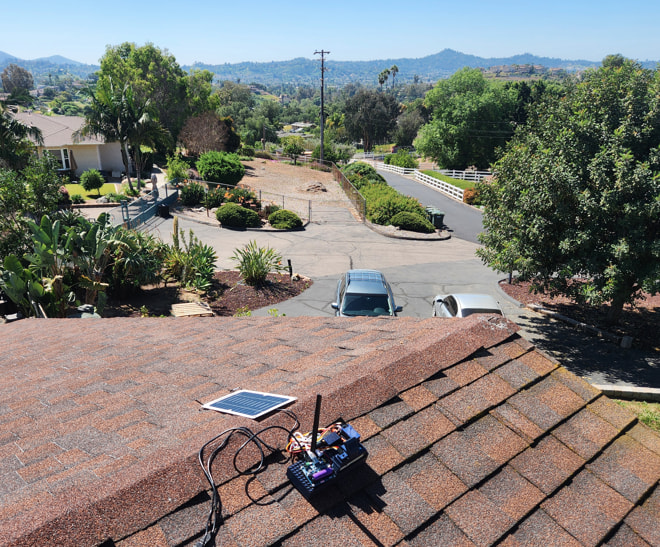
and even in the car..

I was able to receive the signal 1.5km distant!

This was definitely not just line-of-sight, as there were significant hills, houses, trees, etc. in between the sender and receiver.
Connecting a MakerPort Weather Station
The following draft outlines steps for connecting a prototype weather station to The Things Network (TTN) and Rich Nguyen’s platform, FloodWatch. For a demonstration, see the thirty-second YouTube video of Rich using the system (below):

Initial Weather Station Setup
When Jo Watts travels to the Hawthorne-Scribner High School (HSHS) in the Bududa District of eastern Uganda in May 2026, he will initially set up the MakerPort-based weather station developed by Roger Wagner as a local station. The weather station and MakerPort will be placed outside, connecting to a laptop running Snap! inside the building. The connection between MicroBlocks on the MakerPort and Snap! on the laptop will be made either via a direct USB cable or via Bluetooth. The temperature in Bududa rarely drops below 60 degrees, so the windows are open to the elements. This should facilitate the process of connecting the MakerPort to the laptop via a USB cable if necessary.
This process will be used to ensure that, in the process of transporting the hardware from the U.S. to Uganda, there are no loose wires or connections. It also will provide an opportunity for the Sangala Scholars to begin using MicroBlocks and Snap!. As an initial project, the Sangala Scholars will create an interface on the laptop to display the weather data using Snap!
Once this introductory project is completed by the Sangala Scholars, they will begin the process of connecting the weather data from the local weather station to The Things Network (TTN). An overview of this process is described below.
Overview of The Things Network (TTN)
The Things Network (TTN) is a global, open-source Internet of Things (IoT) network infrastructure built on LoRaWAN technology. It provides free, long-range, low-power connectivity for IoT devices through a crowdsourced network of gateways. In the WeatherScope project, TTN serves as the routing layer between the laptop running Snap! and the FloodWatch platform developed by Rich Nguyen.
The WeatherScope Connectivity Chain
Data flows through four steps: (1) The MakerPort microcontroller running MicroBlocks collects weather sensor readings and transmits them via LoRa radio. (2) The MicroBlocks-Snap! library extension on the laptop could receive this data from the MakerPort via USB or Bluetooth. Ultimately we would like to make this connection via LoRa if we can get the initial proof-of-concept pilot working with existing methods. (3) Snap! on the laptop connects to TTN’s Application Server via MQTT and publishes the sensor data. (4) TTN automatically forwards the data to the FloodWatch platform via a pre-configured webhook.
Step 1: Create a TTN Account and Application
Go to thethings.network and create a free account. In the TTN Console, create a new Application (e.g., “weatherscope-bududa”). Each application is assigned a unique Application ID used for MQTT connections and topic routing. TTN offers a free Community tier that supports the WeatherScope use case.
Step 2: Register the MakerPort as an End Device
Within the TTN application, register the MakerPort’s LoRa module as an end device. TTN supports two activation methods: OTAA (Over-the-Air Activation, the recommended method) and ABP (Activation By Personalization). During OTAA registration, TTN provides three credentials: a Device EUI, an Application EUI, and an Application Key. These are programmed into the MakerPort’s LoRa module via MicroBlocks to authenticate the device on the network.
Step 3: Generate MQTT API Credentials
In the TTN Console, navigate to Integrations > MQTT. Click “Generate new API key.” Copy this key immediately—it will not be displayed again after leaving the page. Note also the MQTT server address shown on this page (e.g., nam1.cloud.thethings.network for North America). These credentials allow Snap! on the laptop to authenticate with TTN’s MQTT server.
Step 4: Connect Snap! to TTN via MQTT
Snap! on the laptop connects to TTN’s MQTT server using the Application ID and API key as credentials. The MQTT username format is {application-id}@ttnttn and the password is the generated API key. Once connected, Snap! publishes sensor data to the TTN uplink topic v3/{application-@ttnd}@ttn/devices/{device-id}/up. TTN’s Application Server receives and processes the payload, making it available for downstream integrations. Note: an extension to the existing MicroBlocks-Snap! library is under development by John Maloney and Roger Wagner to support this LoRa-to-MQTT connectivity path.
Step 5: Configure the FloodWatch Webhook
In the TTN Console, navigate to Integrations > Webhooks and click “+ Add Webhook.” Select “Custom webhook,” provide a Webhook ID, set the format to JSON, and enter the FloodWatch HTTP endpoint URL as the Base URL. Enable uplink message events. Once configured, TTN will automatically POST sensor data to FloodWatch in JSON format each time an uplink message is received—no ongoing laptop connection is required after initial setup.
Next Steps
Kayla Sprincis, the FloodWatch IoT lead, will provide the FloodWatch endpoint URL and step-by-step guidance for configuring the TTN-FloodWatch webhook connection. Once the MicroBlocks-Snap! LoRa extension is complete and the TTN application is registered, the end-to-end data path from the weather station in Bududa, Uganda to the FloodWatch monitoring dashboard will be operational.
Today I tested the range with the DX-LR03, which it says it has twice the range (up to 10km line-of-sight) than the DX-LR02, which I used previously. ( Amazon.com: DX-LR03 Development Kit Easy to use 868/915MHz LoRa ASR6601 with Antenna at Commands Uart Interface Long Range 10KM 28dBm Transceiver Wireless Module for Arduino (LR03 868 915Mhz Set) : Industrial & Scientific )
I also tried out the roof-mounted antenna, for the convenience of not holding my receiving unit outside the car window. It might have been better at receiving the signal, or not. I didn’t see an obvious difference between holding my receiving unit outside the window and using the magnetic antenna.
Today’s range was indeed almost twice what I measured with the LR02, 2.8km vs. 1.5km.
Keep in mind that this test was conducted in an area with a lot of hills, houses and trees.
